10. LLMs for Chemistry
Large Language Models are advanced AI systems trained on massive text datasets that can understand context and generate human-like text. They act as foundational models in natural language processing, capable of completing sentences, answering questions, writing code, and more. In chemistry, LLMs offer a powerful new way to accelerate research and education. These models have been fine-tuned to perform tasks ranging from predicting molecular properties to summarizing literature, sometimes matching or even outperforming specialized chemical machine learning models, especially when data is scarce. Because LLMs are trained on vast internet text (including scientific articles), they carry a wealth of chemical knowledge that can be utilized with the right prompts.
The illustration above (from an ACS Press release) depicts a chemist teaming up with a ChatGPT-based assistant to glean new insights in materials chemistry.
Of course, LLMs are not magic oracles. They have limitations; an LLM might sound confident while giving an incorrect chemical fact, or treat chemical notation as just text and produce unrealistic structures. For instance, without proper guidance, an LLM may manipulate a SMILES string by simple text substitutions (adding or changing characters) rather than truly understanding chemical validity. This can lead to nonsensical molecules or invalid formulas. In other words, LLMs do not inherently know chemistry rules. They only predict likely text patterns. However, with careful prompts and domain checks, these pitfalls can be mitigated.
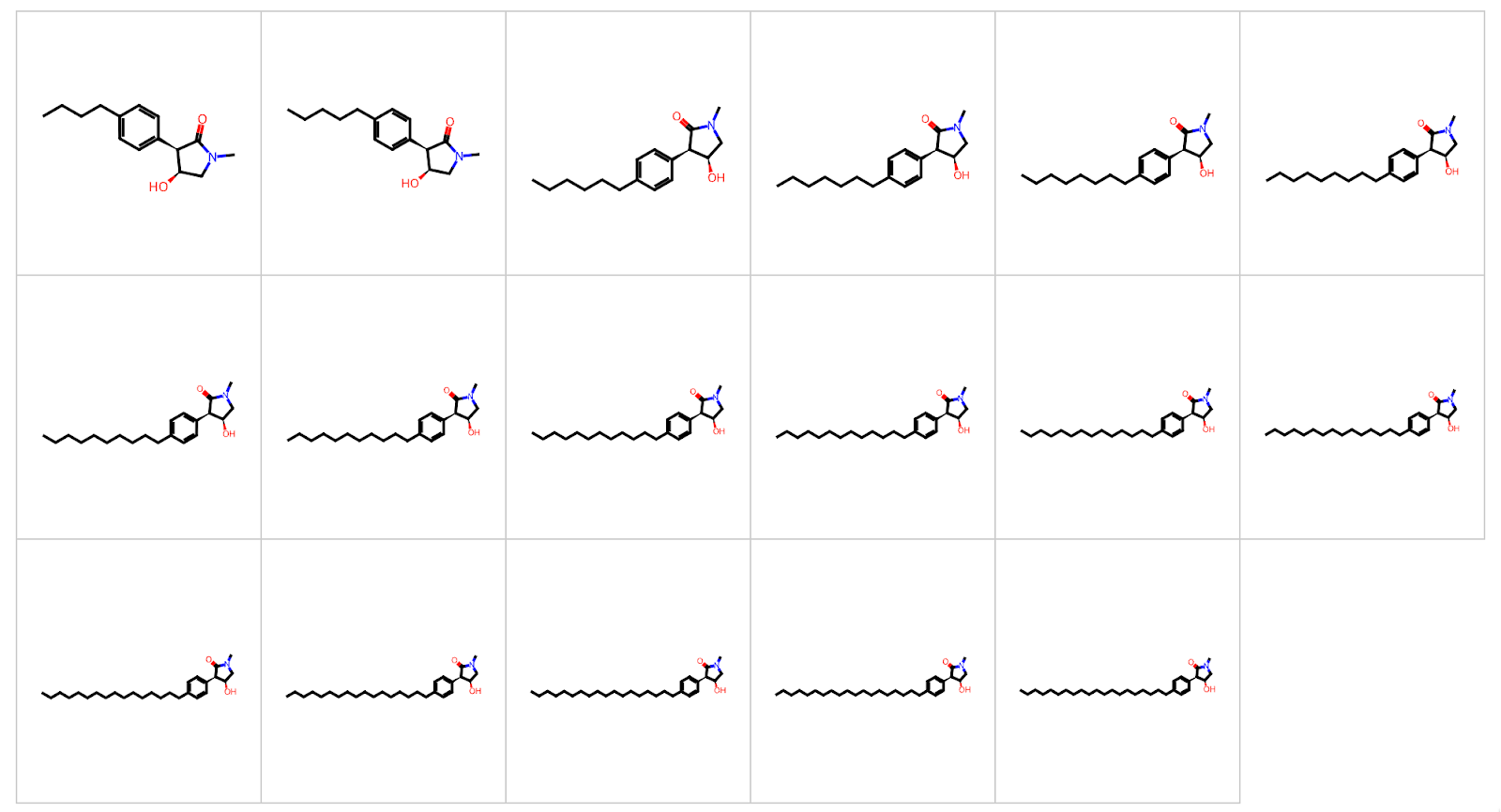
An illustration of an LLM erroneously extending a chemical structure by lengthening an alkyl chain repeatedly (each step adding one more carbon). The model was essentially treating the SMILES string as malleable text without understanding the chemistry, resulting in a series of increasingly long and pointless alkyl chains. This “methyl-ethyl-futile” behavior underscores the importance of validating LLM outputs with chemical common sense.
So, what exactly are LLMs, and why are they so powerful for chemists? How to use them effectively? Let’s dive in.
10.1 Introduction of LLMs
What are LLMs?
-
Large Language Models are AI systems like ChatGPT, GPT-4, or Google’s Gemini. They consist of neural networks with billions of parameters trained on enormous data. By learning patterns from books, articles, and web text, LLMs develop a broad understanding of language and facts.
-
In essence, an LLM predicts the next word in a sentence based on context. With sufficient training data, this simple mechanism yields surprisingly fluent and knowledgeable responses. Modern LLMs can even perform tasks they weren’t explicitly trained for.
What can they do?
- Understand questions and context: LLMs can parse complex, open-ended questions in chemistry and figure out what information is being sought. They can read the query and any provided context, like experiment details or data tables, to grasp the problem.
- Generate human-like answers: Given a prompt, LLMs produce text that often reads as if written by a human. They can explain concepts, summarize documents, or draft reports in coherent prose. For example, an LLM could write a summary of a 50-page synthesis protocol or explain a reaction mechanism in simple terms.
- Retrieve and synthesize knowledge: Because they were trained on vast amounts of text, LLMs have a large knowledge base. They can recall facts (e.g., boiling points, chemical formulas) and even combine pieces of knowledge to answer complex questions.
- Translate between representations: LLMs can convert information from one format to another. For instance, you can ask for the IUPAC name of a molecule given its SMILES string, or vice versa, and the model will attempt to translate it. They can also summarize a molecular structure in plain English, or interpret a reaction described in words and output reactants/products in chemical notation.
- Automate tedious tasks: In research, LLMs can automate literature searches and data extraction. Instead of manually reading hundreds of papers, a chemist can have an LLM pull out specific data (yields, conditions, safety notes) from those papers. LLMs can also draft emails, write code for data analysis, or format references, saving time on routine chores.
- Brainstorm and hypothesize: LLMs can serve as creative partners. They might suggest potential reagents for a reaction, propose mechanisms, or generate new ideas. They excel at summarizing and rewording, which helps in preparing reports or simplifying complex information for students.
In short, LLMs act as versatile language assistants. They help make complex information clearer and easier to work with, even if you don’t have a deep chemistry background. By offloading tasks like summarization, translation, or information retrieval to an AI, chemists can free up time for deeper analysis and creativity.
→ Such applications can substantially speed up research processes, improve accuracy by reducing human error in transcription, and open up new avenues for discovery. A well-used LLM becomes a tireless lab assistant that can answer questions, generate ideas, and handle paperwork—all through natural language interaction.
Section 10.1 - Quiz Questions
1) Factual Questions
Question 1)
LLM is an acronym for:
A. Limited‑Length Memory
B. Large Language Model
C. Layered Lattice Matrix
D. Linear‑Loss Machine
▶ Click to show answer
Correct Answer: B▶ Click to show explanation
An LLM is a Large Language Model trained on vast text corpora to understand and generate human‑like language.Question 2)
Which capability is not typically associated with an LLM used in chemistry?
A. Summarising a 50‑page synthetic protocol
B. Translating SMILES to IUPAC
C. Running ab initio molecular‑orbital calculations
D. Answering literature questions in natural language
▶ Click to show answer
Correct Answer: C▶ Click to show explanation
LLMs work with text; high‑level quantum calculations require specialised physics engines, not language models.2) Comprehension / Application Question
Question 3)
You ask an LLM: “List three advantages of using ChatGPT when preparing a lab report.”
Which response below shows that the model has understood the chemistry context rather than giving generic writing advice?
A. Use active voice, avoid jargon, add headings.
B. Quickly draft the experimental Procedure section, check safety phrases (e.g., ‘corrosive,’ ‘flammable’), and suggest ACS‑style citations for each reagent.
C. Provide colourful images, add emojis, write shorter paragraphs.
D. Increase your font size to 14 pt.
▶ Click to show answer
Correct Answer: B▶ Click to show explanation
Only option B references elements specific to chemistry reports (procedure, hazards, ACS citations).10.2 Prompt Engineering
Definition:
Prompt engineering is the art of writing effective inputs or instructions for an LLM to get the desired output. Think of it as formulating your question or task in the clearest, most precise way so the AI understands exactly what you need. In chemistry or any specialized field, how you ask a question greatly influences the usefulness of the answer you get.
Why is it important in chemistry?
Chemistry questions can be complex and nuanced. A poorly worded prompt might confuse the model or yield a generic answer. By contrast, a well-crafted prompt can guide the LLM to provide a detailed, accurate, and context-aware response. For example, asking “What happens if I mix chemical A and B?” is vague. A better prompt would be: “You are a chemist. Explain the reaction (if any) between acetone and sodium metal, including any relevant equations and safety precautions.” The second prompt gives context (chemist), specifics (acetone and sodium), and what to include (equations, safety), so the model knows what’s expected.
Format of a Good Prompt:
A comprehensive prompt may include several components to set the stage:
-
Role or Context: Tell the model who it is or what perspective to take.
Example: “You are an expert synthetic organic chemist…” This can make the answers more authoritative and domain-specific. -
Task/Instruction: Clearly state what you want.
Example: “…Given the SMILES string of a molecule, provide the IUPAC name.” -
Input Data (if any): Provide the specific data or question.
Example: “SMILES:CC(=O)OC1=CC=CC=C1C(=O)O“(which is aspirin’s structure). -
Desired Output Format: Specify how you want the answer. Example: “Output the product as a SMILES string only, with no extra commentary.”
-
Additional Constraints or Details:: Include any other relevant info or requirements. Example: reaction conditions, assumptions, what not to mention, etc. “Assume standard temperature and pressure,” or “If no reaction, explain why not.”
-
Few-shot Examples: Provide examples of input-output pairs to illustrate what you expect (especially if the task is unusual). This helps the model pattern-match the format.
Example: Input: “Benzene + Br₂ (FeBr₃ catalyst)” → Output: “Bromobenzene (major product) and HBr”.
Input: “Toluene + Cl₂ (light)” → Output: “Benzyl chloride (via free radical substitution).”
By structuring prompts with these elements, you reduce ambiguity. Essentially, you’re giving the LLM a template for how to think and respond.
Example Task and Prompt:
Task: Predict what happens when hydrogen gas is bubbled into water
A naive prompt might be: “What happens when H₂ is added to H₂O?” But this could yield a superficial answer. Instead, use a detailed prompt:
“You are a chemical safety expert. Explain what happens when hydrogen gas (H₂) is introduced into water at room temperature and pressure. Include in your answer:
- Whether any chemical reaction occurs (and why or why not)
- Physical behavior of H₂ in water (solubility, etc.)
- Any potential hazards or safety considerations (e.g., flammability)
- An equation if a reaction happens (or a note that no reaction happens under normal conditions)
- The reasoning in plain language
Example format:
When chlorine gas (Cl₂) is bubbled into water:
- Reaction: Cl₂ reacts with H₂O to form HCl and HOCl.
- Details: Cl₂ is moderately soluble; it’s a green gas that will dissolve and undergo a hydrolysis equilibrium. The reaction is exothermic but won’t boil the water under ambient conditions. The solution becomes acidic (due to HCl) and acts as a bleach (HOCl is an oxidizer).
- Hazards: Cl₂ is toxic, and the acid formed is corrosive. Proper ventilation and protective equipment are required.
Now, following that format, explain the H₂ and H₂O case.”
In the above prompt, we:
- Set the role (“chemical safety expert”).
- Clearly asked for an explanation of H₂ in water.
- Listed bullet points of what to include.
- Even gave an example with chlorine, so the model knows the level of detail and format we want.
Tips for Effective Prompts:
- Be specific: Clearly identify compounds by name, formula, or structure. For example, instead of “this compound,” say “ethanol (CH₃CH₂OH).”
- Provide context: If the question relates to a particular field (analytical chemistry, organic synthesis, etc.), mention it. For example, “In polymer chemistry, explain…”
- State the output style: If you want a list, ask for a list. If you want an explanation, say so. For example, “List the steps…”, “Explain why…”
- Avoid ambiguity: If a term could be interpreted in different ways, clarify it. For instance, “Lewis structure of NO₂” might be interpreted as needing a drawing (which the model can’t provide in text), so instead ask “Describe the bonding and electron arrangement in NO₂ (nitrogen dioxide) in words.”
- Refine iteratively: If the answer isn’t what you want, you can tweak the prompt and try again. Prompt engineering is often an iterative process. You adjust the wording until the model’s output meets your needs.
By mastering prompt engineering, you essentially learn to “program” the LLM with natural language. This is a powerful skill for chemists using AI, ensuring that you get accurate, relevant, and insightful answers.
Section 10.2 - Quiz Questions
1) Factual Questions
Question 1)
In a well‑structured prompt, the portion “SMILES string: CCO” is best labelled as:
A. General Instruction
B. Input Data
C. Relevant Domain
D. Few‑shot Example
▶ Click to show answer
Correct Answer: B▶ Click to show explanation
It supplies the concrete data instance the model must process.Question 2)
Few‑shot examples are included primarily to:
A. Reduce token count
B. Demonstrate the output format and reasoning style the model should mimic
C. Hide the system instruction
D. Increase randomness
▶ Click to show answer
Correct Answer: B▶ Click to show explanation
By pattern‑matching the examples, the model generalises to the new query.2) Comprehension / Application Questions
Question 3
You write the single‑line prompt: “Predict the major product.”
Your LLM responds with a 700‑word essay and no product structure. Which prompt‑engineering fix is most direct?
A. Add more temperature detail.
B. Specify “Output only a SMILES string, no commentary.”
C. Increase the temperature parameter to 2.
D. Split the prompt into two requests.
▶ Click to show answer
Correct Answer: B▶ Click to show explanation
Explicit output restrictions steer the model to a parsable answer.10.3 Usage of LLM APIs
LLMs can be accessed via web interfaces or through APIs (Application Programming Interfaces) that allow you to integrate the model into your own programs and tools. For chemists, using an API means you can connect an LLM to a data analysis pipeline, a lab notebook, or a chemical inventory system.
Let’s focus on OpenAI’s API and walk through how to set it up in a Google Colab notebook. Colab is convenient because it lets you run Python code in the cloud without installing anything locally.
Setting Up OpenAI API (Google Colab)
1. Open a notebook:
Go to https://colab.research.google.com and create a new Python 3 notebook. This gives you an environment to write and run code interactively.
2. Install required packages:
In a Colab cell, install the libraries you’ll need. For example, you might need the OpenAI package (to call the API), pandas/numpy for data handling, and kaggleb to install the dataset. Use pip to install
!pip install openai pandas numpy kagglehub
3. Obtain an API key:
If you haven’t already, sign up on OpenAI’s website to get an API key. This key is a string that authenticates your usage of the model. Never share this key publicly (it’s like a password). In Colab, it’s best to set the key as an environment variable so it’s not displayed in the notebook
import os, openai
os.environ["OPENAI_API_KEY"] = "YOUR_OPENAI_API_KEY"
# or if set as key in Colab environment
from google.colab import userdata
os.environ['OPENAI_API_KEY'] = userdata.get('OPENAI_API_KEY')
This ensures the key is stored securely in the session environment (the OpenAI library will read it from there).
4. Load or prepare data (Optional):
If you want to ask the LLM questions about a dataset (a CSV file of chemical compounds), load that data in Python. For example, let’s load a dataset of blood-brain barrier permeability (BBBP) from Kaggle:
import kagglehub, pandas as pd
path = kagglehub.dataset_download("priyanagda/bbbp-smiles")
df = pd.read_csv(f"{path}/BBBP.csv")
print(df.head(5))
If the data is not on Kaggle, you can use Python’s requests to download from a URL, or upload the file to Colab manually. For instance:
import requests
url = "https://raw.githubusercontent.com/.../mychemdata.csv"
r = requests.get(url)
open("data.csv", 'wb').write(r.content)
df = pd.read_csv("data.csv")
5. Make an API call to the LLM:
Using the OpenAI Python library, you construct a chat completion request. This involves specifying the model (e.g., “gpt-4” or another available model) and providing a list of messages.
from openai import OpenAI
client = OpenAI()
response = openai.ChatCompletion.create(
    model="gpt-4o",
    messages=[
      {"role": "system", "content": "You are an expert chemist. Answer in concise Markdown format."},
      {"role": "user", "content": "What is the IUPAC name of aspirin?"}
    ],
    temperature=0.5,
    max_tokens=200
)
answer = response["choices"][0]["message"]["content"]
print(answer)
A few things to note here:
- We set a system role message to prime the assistant with a persona or style (expert chemist, answer in Markdown). This can help get more accurate and well-formatted answers.
- The user message contains the actual question.
- Temperature=0.5 controls randomness (0 is deterministic, 1 is quite random). For factual questions, a lower temperature is usually better.
- Max_tokens=200 limits the length of the answer (since we don’t need a super long explanation for a simple question).
- The model returns a JSON with multiple potential choices. Here, we just take the first answer’s content.
6. Using the LLM with your data (Optional):
You can also incorporate data into the prompt. For example, if you loaded a DataFrame df with some chemical info, you might do
sample = df.head(5).to_csv(index=False)  # take first 5 rows as a sample in CSV format
query = f"Here is some data:\n{sample}\n\nQuestion: Which of these compounds is most polar?"
response = openai.ChatCompletion.create(
    model="gpt-4o",
    messages=[
      {"role": "system", "content": "You are a knowledgeable chemist."},
      {"role": "user", "content": query}
    ],
    temperature=0.0,
    max_tokens=100
)
print(response["choices"][0]["message"]["content"])
The model will see the data snippet and the question, and attempt to answer using both its trained knowledge and the provided data.
7. Evaluate the results (Optional):
Once the model gives an output, you might want to evaluate its correctness. For simple factual Q&A or classification tasks, you can compare the answer to a ground truth. For instance, if you have a CSV of test questions and answers, you could loop through them, get model answers, and calculate accuracy. Here’s a conceptual example using a benchmark from ChemLLMBench
import pandas as pd
test_df = pd.read_csv("https://raw.githubusercontent.com/ChemFoundationModels/ChemLLMBench/main/data/name_prediction/llm_test.csv")
def query_iupac(smiles):
    prompt = f"Convert this SMILES to an IUPAC name: {smiles}"
    res = openai.ChatCompletion.create(
        model="gpt-4o-mini",  # example model name, could be GPT-4 or a smaller model
        messages=[{"role": "user", "content": prompt}],
        temperature=0.0,
        max_tokens=50
    )
    return res["choices"][0]["message"]["content"].strip()

correct = 0
for idx, row in test_df.iterrows():
    smiles_str = row["SMILES"]
    true_name = row["IUPAC"]
    pred_name = query_iupac(smiles_str)
    if pred_name.lower() == true_name.lower():
        correct += 1
accuracy = correct / len(test_df)
print(f"Model accuracy on SMILES→IUPAC test: {accuracy:.2%}")
This loop goes through each SMILES in the test set, asks the model to provide an IUPAC name, and checks if it exactly matches the known correct name. The result might show a very low accuracy, reflecting the fact that direct SMILES-to-name translation is a difficult task for current LLMs. Remember that each API call costs tokens (which correspond to a portion of your API usage credits).
Section 10.3 – Quiz Questions
1) Factual Questions
Question 1
In the Colab setup, the purpose of
os.environ["OPENAI_API_KEY"] = "YOUR_OPENAI_API_KEY"
is to:
A. Download a dataset from Kaggle
B. Make the key available to the openai library inside the session’s environment
C. Encrypt your code cell
D. Select the GPT‑4 model
▶ Click to show answer
Correct Answer: B▶ Click to show explanation
The key is stored as an environment variable so the SDK can read it without hard‑coding.Question 2
Which argument in openai.ChatCompletion.create(..., max_tokens=1000, ...) mainly controls result length?
A. temperature
B. top_p
C. max_tokens
D. model
▶ Click to show answer
Correct Answer: C▶ Click to show explanation
`max_tokens` sets the upper bound on generated tokens, limiting output size.2) Comprehension / Application Questions
Question 3
You call the Chat Completion API twice with the exact same prompt but get different answers each time.
Which settings will make the response identical on every call?
A. temperature = 1.0, top_p = 1.0
B. temperature = 0.0, top_p = 1.0
C. temperature = 0.0, top_p = 0.0
D. temperature = 0.5, top_p = 0.5
▶ Click to show answer
Correct Answer: C▶ Click to show explanation
Setting both temperature and top_p to 0 removes all randomness, forcing the model to choose the highest‑probability token at each step—so identical prompts yield identical outputs.10.4 Interactive Programming
Interactive programming refers to using tools like Jupyter Notebooks or Colab to write code in small chunks and immediately see results. This is incredibly useful when working with LLMs, because you can try a prompt, see the output, and iteratively refine your approach in real time. In a chemistry context, you might use an interactive notebook to prototype how an LLM analyzes a dataset or answers a set of chemistry questions, adjusting on the fly.
Let’s continue with the Google Colab scenario from 10.3 and demonstrate a more interactive workflow, including how to safely store secrets and build a reusable query function.
Colab Tips for Using API Keys
When working in Colab (especially if you plan to share the notebook), you should avoid hard-coding your API key into the code. Colab has a “Secrets” feature:
1. In Colab, click on the sidebar (the 🔒 icon) and add a new secret. Name it something like OPENAI_API_KEY and paste your key in the value field. Enable the notebook to access it.
2. Now, in your code, you can fetch this secure value. For example:
import os
from google.colab import auth, runtime
# Assuming you've added the secret already:
os.environ['OPENAI_API_KEY'] = userdata.get('OPENAI_API_KEY')
This way, the key is not visible in your code or output. It’s stored in Colab’s backend and injected at run-time. If someone else opens your notebook, they won’t see your secret value.
Storing keys as secret variables keeps them out of the notebook content, which is a much safer practice than putting the raw key in a cell.
Creating a Helper Function for Queries
To streamline repeated calls, it’s handy to wrap the API call in a function. You can also integrate data loading or formatting into it. For example:
def ask_chemistry_gpt(prompt, data_path=None):
    """
    Send a prompt to the GPT model (with optional dataset context) and return the response.
    If data_path is provided and points to a CSV, include the first few lines of the dataset in the prompt.
    """
    context = ""
    if data_path:
        try:
            df = pd.read_csv(data_path)
            context = f"\nHere is a sample of the dataset:\n{df.head(5).to_csv(index=False)}"
        except Exception as e:
            print(f"Could not load data from {data_path}: {e}")
    # Construct the message list
    messages = [
        {"role": "system", "content": "You are a helpful chemistry assistant."},
        {"role": "user", "content": prompt + context}
    ]
    response = openai.ChatCompletion.create(
        model="gpt-4o-mini",  # or another model available to you
        messages=messages,
        temperature=0.7,
        max_tokens=500,
        top_p=1.0
    )
    answer = response["choices"][0]["message"]["content"]
    return answer.strip()
What this function does:
- If data_path is given and is a CSV, it reads the file with pandas and appends the first five rows (as a quick preview) to the prompt. This helps the LLM get an idea of the dataset structure (column names, etc.) without overloading it with the entire dataset. Seeing df.head() can help catch formatting issues or give context.
- It defines a basic system prompt to set the tone (helpful chemistry assistant).
- It sends the user prompt plus any data sample as the user message.
- It returns the model’s answer text.
You can now call ask_chemistry_gpt() for different questions without rewriting the API call each time.
Interactive Example: Querying and Evaluating
Let’s say you have a dataset of molecular properties, and you want the LLM to find which compound has the highest value of a certain property, then explain why. You could do:
response = ask_chemistry_gpt(
    prompt="Identify which compound in the dataset has the highest logP and discuss why its logP is high relative to the others.",
    data_path="data/chem_properties.csv"
)
display(Markdown(response))
This would print the answer in a nice Markdown format in Colab, potentially including a table or list if the model responds with one.
If the response isn’t what you expected, you can tweak the prompt (maybe specify the property name exactly, or ask for results in bullet points) and run again. This interactivity is great for prompt debugging.
Example Notebook:
https://colab.research.google.com/drive/1OTwuTwfE9ZoYIVrPvTgSCFYa4JXOrTtR#scrollTo=6UyCksNPwlP5
A Note on Monitoring and Limits
When working interactively, especially in a loop or multiple rapid-fire queries, be mindful of API rate limits and costs. OpenAI APIs might rate-limit you if you send too many requests too quickly. If you plan to do heavy usage (like evaluating hundreds of questions), consider adding time.sleep() pauses between calls or using batch requests if available. Also, print intermediate results to make sure the process is doing what you expect.
Finally, always validate important outputs manually. LLMs can produce convincing-sounding answers that are incorrect. An interactive session with an LLM is a partnership: the AI provides drafts or suggestions, and the human chemist reviews and verifies them.
Section 10.4 – Quiz Questions
1) Factual Questions
Question 1
Storing the API key in Colab “Secrets” is safer than typing it in plain text because:
A. It shortens execution time.
B. The key is hidden in the notebook UI and not saved to revision history.
C. It gives you free credits.
D. The model runs locally.
▶ Click to show answer
Correct Answer: B▶ Click to show explanation
Secrets are masked and excluded from shared notebook diffs, reducing accidental leakage.2) Comprehension / Application Questions
Question 2
In our helper function, we show df.head() (the first few rows of the dataset) to the LLM before asking a question. Why is it useful to include a small snippet of the dataset in the prompt?
A. To compute a cosine similarity between rows.
B. To verify the LLM’s training data.
C. To help the model understand the data’s format (columns, units) and avoid parsing errors.
D. To reduce the token usage by only sending part of the data.